In most cases, reps spend more time prospecting before sending an email than writing it. The sales rep should analyze which accounts to pick, what is happening in the firm, whether any marketing behaviors were observed, find the right contact person, check the dialogue track, and determine whether the interaction makes sense. HubSpot Prospecting Agent was created to facilitate these tasks.
The current version does more than draft a personalized sales email. You can define different selling profiles, enroll contacts manually or automatically, control when messages go out, require a rep to review each email, or allow the agent to send automatically. HubSpot’s newer buying-signals functionality can also monitor companies for activity that may justify outreach, recommend accounts, and help identify the contacts a rep should approach.
Nevertheless, switching the Prospecting Agent on does not make a blurry sales process more understandable. The agent should still know who to contact, what good or service you provide, what signs matter, who should send an email, when follow-up should end, and what to do after the prospect responds. If these aspects are not clarified in HubSpot, no automated outreach will help solve that issue.
In this blog post, we’ll explain how the HubSpot Prospecting Agent works, what information it uses, how to set it up, how to enroll the right prospects, when to use human review or automatic sending, how buying signals fit into the process, and what your sales team should measure once the agent is running.
Key Highlights
- The HubSpot Prospecting Agent can research prospects, prepare personalized outreach, and send or queue emails based on the rules you configure.
- Selling profiles let you separate messaging by product, audience, positioning, sender, tone, and call to action.
- HubSpot currently allows up to 85 selling profiles.
- Contacts can enter the agent manually, through automated rules, through workflows, or from target accounts.
- Teams can choose Review before sending or Send automatically for each selling profile.
- Adaptive outreach can change timing and content according to prospect engagement, while scheduled outreach follows a defined cadence.
- The current buying-signals beta can monitor companies, recommend accounts, and help source contacts for outreach.
- Prospecting Agent uses HubSpot Credits, so usage should be monitored as part of the rollout.
- HubSpot applies cold-outreach and daily-send limits that sales teams should understand before increasing volume.
What Is HubSpot Prospecting Agent?
Source: HubSpot
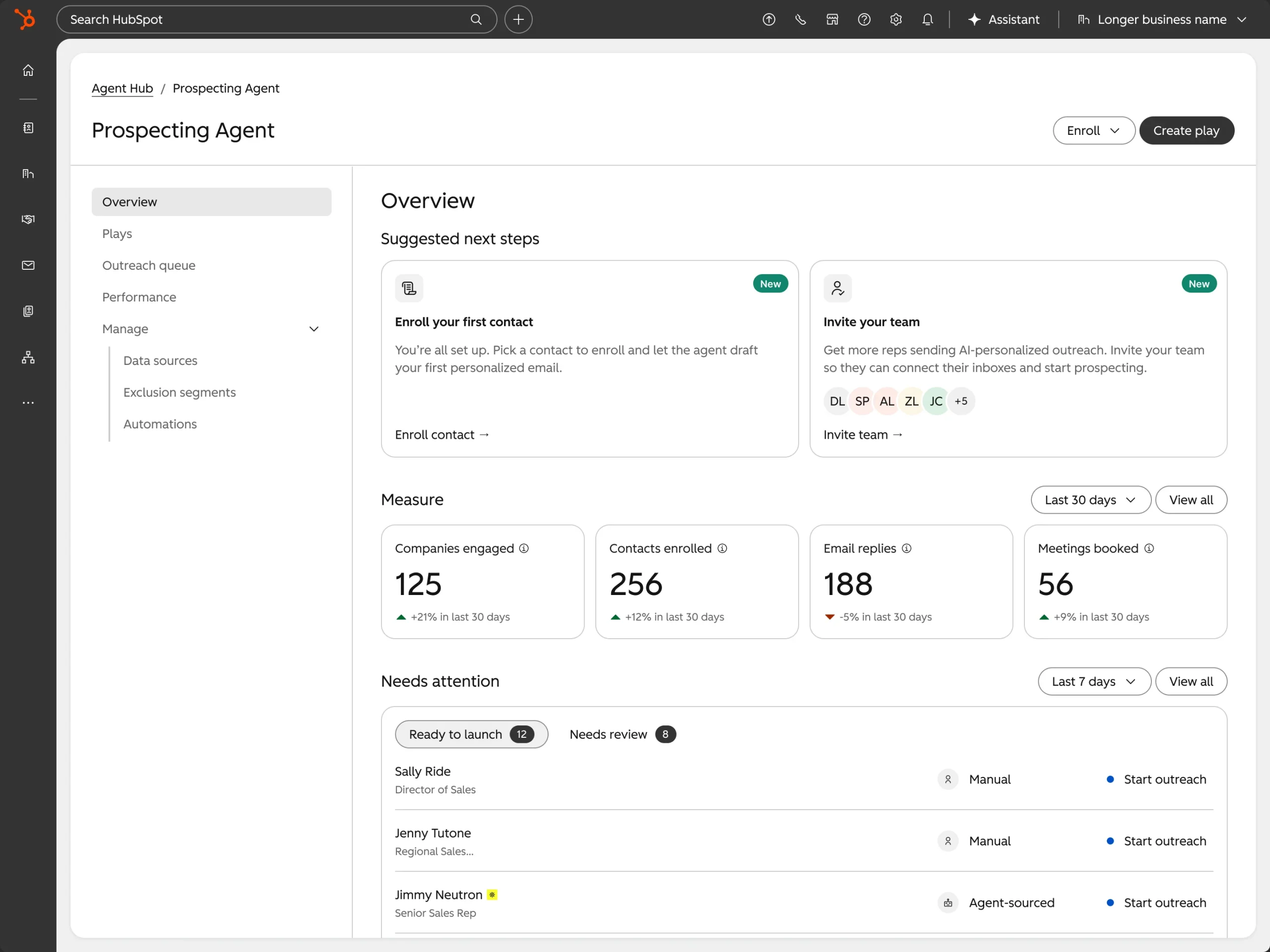
HubSpot Prospecting Agent is a sales prospecting tool inside HubSpot that researches prospects, uses CRM and engagement context to prepare personalized outreach, and can send or queue those emails according to rules set by your sales team.
The easiest way to understand the tool is to think about the work a sales rep normally does before sending an outbound email. They look at the company, review the contact, check previous engagement, understand what the business sells to that persona, and decide what message could start a relevant conversation.
Prospecting Agent brings these steps together inside HubSpot. However, it does not operate without direction. The sales team still decides the audience, positioning, sending rules, frequency, exclusions, sender identity, and next step. HubSpot can then perform the research and drafting within those boundaries.
That distinction matters because good prospecting is not simply about producing more email. It is about deciding who deserves an email in the first place and giving that person a reason to respond.
How Does HubSpot Prospecting Agent Work?
Here is the working process of HubSpot Prospecting Agent, which includes:
1. HubSpot decides which prospects should enter the agent
The first decision is enrollment. HubSpot currently lets teams enroll contacts or companies manually, use automated enrollment rules, use a workflow, or work from target accounts in the sales workspace.
That gives you plenty of flexibility, but it also creates a risk: it becomes very easy to automate enrollment before deciding who should actually receive outreach.
For example, suppose a SaaS company wants to prospect marketing leaders at companies with 100 to 500 employees. A broad rule such as “Job title contains Marketing” would probably bring in too many contacts. A better rule might also consider company size, lifecycle stage, account status, geography, whether an open deal already exists, and how recently a sales rep contacted the person.
The quality of the enrollment rule affects everything that happens afterwards. This is why the prospecting strategy should come before the automation rule.
2. The agent reviews the contact and company context
Once a prospect enters the agent, HubSpot can use CRM information and recent engagement to understand the relationship.
HubSpot says the Prospecting Agent can consider contact-associated engagement from up to the past year, including form submissions, page views, calls, meetings, notes, and email opens. That information can change the message considerably.
A completely cold contact who has never interacted with your company should not necessarily receive the same email as someone who attended a webinar, opened several sales emails, and recently returned to your pricing page.
The company context matters too. Perhaps the account has recently received funding, hired a new sales leader, started researching a topic connected to your product, or returned to your website after several months of inactivity. Those events can give the rep a more relevant reason to start a conversation.
The agent can use that context, but the sales team still needs to decide which signals actually matter to the offer.
3. The selling profile tells the agent how you sell
The selling profile is one of the most important parts of Prospecting Agent setup. This is where you define the sales context the agent should use when preparing outreach. A selling profile can represent a particular product, audience, positioning, tone, sender, call to action, supporting document, or URL. HubSpot currently allows up to 85 selling profiles, so companies do not need to force every outbound motion through one generic setup.
Here is a scenario. Consider a company selling HubSpot managed services. The VP of Marketing at a SaaS business considering a first HubSpot implementation has a different problem from a RevOps leader whose existing HubSpot portal has poor data and broken reporting.
Both prospects may eventually buy the HubSpot consulting services, but the reason they would respond is different.
A selling profile for implementation could focus on CRM setup, migration, automation, and team adoption. A separate profile for an existing HubSpot customer could focus on audit findings, lifecycle problems, workflow cleanup, and reporting. The tighter the selling profile, the less work the agent has to do to guess what matters.
4. Prospecting Agent builds the outreach around that context
Once HubSpot has the prospect information and the selling instructions, it can prepare the outreach. The difference between useful personalization and shallow personalization becomes important here.
Adding someone’s first name, company, and job title does not make an email relevant. A better message connects the contact’s role, company situation, recent activity, and likely business problem with the reason for reaching out.
For example, simply mentioning a funding announcement does not automatically improve an email. If your company sells CRM implementation services, a recent funding round might matter because the prospect is hiring salespeople, adding processes, and putting more pressure on the CRM. That gives the funding signal a business connection.
If your service has nothing to do with what usually follows a funding round, mentioning the announcement simply shows that someone found the news. The agent can help with the research and drafting, but the selling profile should tell it what those signals mean to your particular sales motion.
5. You choose whether a rep reviews the message
HubSpot provides you with two main options for email approval: Review before sending or Send automatically. For most new implementations, review mode is the sensible place to start.
It allows the sales team to inspect the research, see how the agent interprets the selling profile, correct weak assumptions, and identify patterns in the drafts before any message reaches a prospect automatically.
You may find, for example, that the emails understand the audience correctly but use the wrong call to action. Or the positioning may be good for marketing leaders but too technical for executives. These are selling-profile problems. You can correct the instructions once instead of having every rep rewrite every email.
Automatic sending becomes much easier to consider after you have reviewed enough drafts to know how the profile behaves across different prospects. Even then, you do not need to automate everything. High-value accounts can remain in review mode while a narrower, well-tested segment uses automatic sending.
6. The agent adjusts or stops when the prospect engages
Prospecting Agent is not designed to keep emailing someone indefinitely. HubSpot automatically unenrolls contacts when they book a meeting, reply to an email, or reach the maximum number of emails configured for the selling profile.
You can also choose between Adaptive and Scheduled outreach. Scheduled outreach follows the cadence you set. Adaptive outreach can change timing and content based on prospect behavior or engagement. Current adaptive enrollments normally end after 30 days unless you set up a process for re-enrollment. This gives the sales team another choice.
If the sales motion needs a predictable sequence of touches, scheduled outreach may be easier to manage. If the timing should change according to how the prospect behaves, adaptive outreach may fit better.
Prospecting Agent Buying Signals and Contact Sourcing
One of the biggest changes to Prospecting Agent in 2026 is the move toward signal-led prospecting. HubSpot’s current buying-signals beta allows the agent to monitor companies for activity that may indicate a stronger reason for sales outreach. The agent can recommend companies, suggest contacts, and prepare outreach around the signals it finds.
That changes where the Prospecting Agent can enter the sales process.
Previously, the company might already know which contacts it wanted to prospect and use the agent mainly for research and outreach. With buying signals, the process can begin earlier by helping the sales team decide which companies deserve attention.
What is a Prospecting Play?
A prospecting play gives the agent instructions for a specific sales situation.
The structure we follow is:
Audience → Buying signal → Persona → Selling context → Outreach
Suppose your company sells HubSpot implementation services to B2B SaaS companies. Your audience might be SaaS businesses within a particular employee range. The signal could be rapid hiring or a recent funding event. The persona might be a VP of Marketing or a Revenue Operations leader. The selling context would explain why fast growth often creates CRM, routing, reporting, and automation problems.
Read More:
Now the signal has a purpose. You are not emailing every funded company simply because it appeared in a news feed. You are looking for funded companies where the event creates a business condition that your service addresses. That is the standard your prospecting plays should meet.
How HubSpot Can Help Find the Right Contacts
The buying-signals version of Prospecting Agent can also help identify contacts within recommended companies. HubSpot currently references supported third-party sales intelligence providers such as ZoomInfo, Apollo, and Surfe for contact sourcing. Availability depends on the tools and setup connected to your account.
This can reduce the gap between identifying an interesting company and finding someone worth contacting. However, contact sourcing should still follow your persona rules.
If the company fits your ICP but the only contact available is several levels away from the problem your product solves, that does not automatically make the person a good prospect. Company fit and contact fit are two separate decisions.
Use Signals to Decide When to Reach Out
Buying signals are most useful when they change the timing or priority of outreach. HubSpot’s sales workspace can surface signals such as website visits, research intent, company news, job changes, marketing email clicks, and form submissions. Some of these signals are much stronger than others depending on the sales motion.
A pricing-page visit from a target account may deserve immediate attention. A general blog visit probably does not. A new CRO at a company with an outdated CRM may be relevant to a revenue-operations provider. The same job change may mean very little to another seller. Therefore, don’t treat every signal as intent. Decide which signals genuinely change your reason to reach out and build your plays around those.
How to Set Up HubSpot Prospecting Agent
Here is the step-by-step guide to set up HubSpot Prospecting Agent:
Step 1: Clean up the CRM data that the agent will use
Before setting up enrollment rules, review the records the agent will rely on. Check contact ownership, email quality, company associations, personas, lifecycle stages, open deals, recent outreach, and the segmentation used by sales.
HubSpot specifically recommends checking that a contact’s email address has not previously bounced before enrolling the person in Prospecting Agent.
Ownership is another simple example.
If you configure emails to come from contact owners but half of your target contacts are assigned to former employees, the agent has inherited an operational problem before the first email is drafted.
The same applies to company associations. If the contact is connected to the wrong company, the agent may research the wrong account context and use it in outreach. Get those basics in reasonable shape first.
Step 2: Build one focused selling profile
Avoid starting with a selling profile called something like “All prospects.” Instead, choose one product and one audience that your team already understands.
For example:
- Service: HubSpot implementation
- Audience: US B2B SaaS companies
- Persona: VP of Marketing
- Situation: HubSpot purchased, but implementation has stalled
- Next step: 30-minute consultation
That gives the agent a much clearer sales context than asking it to talk about every HubSpot service to anyone with a senior job title. Once the first profile performs consistently, you can create others for different products, industries, or personas.
Step 3: Choose the sender carefully
Prospecting Agent can send from the contact owner or a single user, depending on the selling-profile setup. The sender decision should match what happens when someone replies.
If the email comes from an account executive, that rep needs to be ready to handle the response. If the account uses a central SDR sender, the routing and handoff process needs to support that model. Do not choose the sender purely because one mailbox has the best technical setup.
The prospect should reach the person or team that can continue the conversation.
Step 4: Give the outreach a clear next step
A prospecting email should make it easy to understand what happens next. HubSpot lets the selling profile ask the prospect to book a meeting and can include a document or URL when relevant.
Choose a call to action that fits the stage of the relationship. A cold prospect may not be ready for a detailed product demo. A short conversation or relevant resource may be more appropriate. A warm inbound lead who has already reviewed pricing may be much closer to a meeting. The CTA should reflect that difference.
Step 5: Set the outreach guardrails
HubSpot allows you to control business-day sending, the send window, minimum days between emails, and the maximum number of emails per enrollment. Do not treat these settings as technical defaults. They are part of your sales policy.
If your SDR team would never send five follow-up emails within eight days, Prospecting Agent should not either. Likewise, if your prospects are mainly in Eastern and Central time zones, the sending window should reflect that.
Exclusion lists matter here as well. Build them before you scale automated enrollment. Existing customers, active opportunities, partners, competitors, employees, sensitive accounts, and anyone who should not receive prospecting outreach need to be excluded deliberately.
Step 6: Start in review before sending mode
The first batch should teach you how the agent interprets your setup. Enroll a small group of prospects that are representative of the audience and review every draft. Do not only ask whether the grammar sounds good.
Look at the research. Is the account context correct? Does the reason for outreach make sense? Is the value proposition right for the persona? Does the email make claims that your sales rep would be comfortable sending under their own name?
Then look for recurring issues. If five drafts all use weak positioning, edit the selling profile rather than fixing five emails individually. That is how you improve the system.
Step 7: Test different types of prospects
Do not only test the easiest contacts in your database. Include a warm inbound lead, a cold target account, a contact with previous sales activity, someone with a strong buying signal, and a prospect with limited CRM history.
You want to see how the agent behaves when context varies. This also provides you with a better idea of which prospects should eventually qualify for automatic sending and which should continue to receive human review.
Step 8: Refine the profile before increasing volume
After the first batch, update the selling information, CTA, tone, exclusions, and advanced instructions where needed. Then run another batch.
Once the team sees consistent quality across different prospects, you can start increasing enrollment or moving specific profiles into automatic sending. That is much safer than enrolling thousands of contacts on day one and trying to fix the configuration after real emails have already gone out.
How to Enroll Contacts in HubSpot Prospecting Agent
HubSpot provides several enrollment methods to teams, and each has a different use case. Here are some of the ways you can enroll contacts in HubSpot Prospecting Agent, including:
Manual Enrollment
Manual enrollment works well when you are testing the agent or working with a smaller number of important accounts. A sales rep or manager selects the contacts or companies and chooses the relevant selling profile before starting outreach. This gives the team a deliberate checkpoint before the prospect enters the process. It is also useful when the selection criteria depend on sales judgment that does not yet exist cleanly in CRM properties.
Automated Enrollment Rules
Automated enrollment works better when the criteria can be described clearly in HubSpot. For example, you may want to enroll contacts who fit a particular persona, belong to target accounts, and meet a specific engagement condition. Before switching a ruleset on, check how many existing contacts already meet those conditions.
HubSpot gives you the option to apply a new automated ruleset to existing eligible records or only to contacts who become eligible in the future. That is an important decision. A broad rule applied to the existing database could enroll a much larger group than expected.
Workflow Enrollment
Workflows give you more control when eligibility depends on several CRM conditions. You might combine lifecycle stage, company tier, recent website activity, ownership, deal status, and another custom property before enrolling the contact.
This is often the better option when prospecting needs to fit into an existing lead-management process rather than operating as a separate sales tool. However, avoid building the same enrollment logic in both Prospecting Agent rules and workflows.
Two systems enrolling the same records creates unnecessary complexity and makes troubleshooting harder.
Target Account Enrollment
Account-based sales teams can also use Prospecting Agent from target accounts. This makes sense when reps already organize prospecting around companies rather than starting with individual contacts.
The team can review the account first, understand the reason it deserves attention, and then select the relevant people inside the company.
That is often a cleaner approach for larger B2B deals. HubSpot also applies restrictions to automated enrollment. A contact will not automatically enroll if they are currently in a sequence, already enrolled in Prospecting Agent, or associated with an open or closed-won deal.
Those rules help reduce overlapping outreach, but your own exclusions should still reflect the way your sales team works.
HubSpot Prospecting Agent vs. Sequences
In the table below, we have explained the major difference between the prospecting agent and sequences.
| Area | Prospecting Agent | Sequences |
| Prospect research | Research can be used when preparing outreach | Rep usually provides the context |
| Email content | Can vary according to prospect context | Usually follows predefined templates |
| Timing | Adaptive or scheduled | Defined sequence schedule |
| Human review | Optional | Rep controls enrollment and templates |
| Buying signals | Can influence prospect selection and messaging | Usually requires another process to act on signals |
| Best fit | Context-led prospecting | Consistent repeatable follow-up |
Sequences still make sense when the sales process needs a predictable cadence. For example, a rep following up after a demo may want a defined set of messages and tasks that stay consistent across every opportunity. Prospecting Agent becomes more useful when the research and message should vary from prospect to prospect.
A company researching a new category, a contact returning to your website, and an account that just hired a new executive may all deserve different outreach even though they fit the same broad ICP. There is no reason to choose one tool for the entire sales organization.
A sales team can use sequences for structured follow-up and Prospecting Agent for research-led prospecting where more context is required.
How The Automation Strategy Group Can Help
The Automation Strategy Group has been a HubSpot Solutions Partner since 2016 and works primarily with B2B companies using HubSpot across sales, marketing, CRM, and automation.
The Automation Strategy Group helps SMEs configure the HubSpot sales process that Prospecting Agent depends on. That can include CRM structure, lifecycle stages, personas, account segmentation, contact ownership, lead routing, lead scoring, sales workflows, pipeline configuration, reporting, and the handoff that should happen once a prospect replies or books a meeting.
From there, our experts can help structure selling profiles, enrollment rules, exclusion lists, outreach guardrails, reporting, and a controlled rollout of Prospecting Agent around the way the sales team already works. Rather than turning on automatic prospecting across the database, the process can start with one defined audience, review the quality of actual outreach, correct CRM or selling-profile issues, and then expand the parts that perform consistently.
Want to use HubSpot Prospecting Agent with a sales process built around your team? Schedule a free consultation call with one of our HubSpot experts.
Frequently Asked Questions
What is HubSpot Prospecting Agent?
HubSpot Prospecting Agent is a HubSpot sales tool that researches prospects, uses CRM and engagement context to prepare personalized outreach, and can either queue those emails for review or send them automatically. The sales team controls the selling profile, sender, cadence, exclusions, and outreach limits.
How does HubSpot Prospecting Agent work?
HubSpot Prospecting Agent starts with an enrolled contact or company, reviews the available CRM and engagement context, applies the relevant selling profile, and prepares the outreach. Depending on the setup, a rep can approve the message before sending or allow the agent to send automatically within the configured guardrails.
What data does HubSpot Prospecting Agent use?
Prospecting Agent can use CRM information and recent contact-associated engagement, including form submissions, page views, calls, meetings, notes, and email opens from up to the previous year. In the buying-signals beta, it can also use relevant company signals when recommending accounts and preparing outreach.
Can HubSpot Prospecting Agent send emails automatically?
HubSpot Prospecting Agent can send emails automatically when a selling profile uses Send mode automatically. Teams can also use Review before sending, which requires the assigned sender to review and approve the outreach first.
How do I enroll contacts in HubSpot Prospecting Agent?
Contacts can be enrolled manually, through Prospecting Agent automated rules, through HubSpot workflows, or through target accounts. HubSpot also applies restrictions to automated enrollment, including preventing contacts from being enrolled when they are already in a sequence, already in Prospecting Agent, or associated with an open or closed-won deal.
What are HubSpot Prospecting Agent selling profiles?
Selling profiles tell Prospecting Agent how to approach a particular sales motion. They can define the product, audience, selling information, sender, tone, call to action, outreach settings, supporting sources, and additional instructions. HubSpot currently allows up to 85 selling profiles, so teams can separate outreach by audience, product, persona, or positioning.
Can HubSpot Prospecting Agent find new contacts?
The current buying-signals and contact-sourcing beta can recommend companies and help identify relevant contacts for outreach. HubSpot can work with supported sales intelligence providers such as ZoomInfo, Apollo, and Surfe depending on the tools connected to the account.
What is the difference between HubSpot Prospecting Agent and Sequences?
Prospecting Agent is better suited to outreach where the research, message, and timing need to change according to the prospect’s context. Sequences work well when reps need a consistent, predefined cadence and set of sales touches. Many sales teams can use both, depending on the type of follow-up or prospecting involved.
Does HubSpot Prospecting Agent use HubSpot Credits?
HubSpot Prospecting Agent uses HubSpot Credits for supported prospecting actions. Included credit amounts depend on the account’s subscription, and administrators can monitor usage and manage credit settings from HubSpot.
Does HubSpot Prospecting Agent replace an SDR?
Prospecting Agent can take on parts of an SDR’s research, drafting, and follow-up workload, but it does not remove the need for sales judgment. Reps still need to define targeting, handle replies, qualify interest, understand complex accounts, manage relationships, and move qualified prospects into the sales process.