
Most teams reach a point where traditional lead generation strategy stops producing real results – especially as you move upstream and are targeting enterprise accounts. You receive leads in your database, send campaigns, and watch the numbers move, but nothing meaningful happens.
You need meetings with the right buyers. You need conversations with people who can purchase. That is where Account-Based Marketing (ABM) steps in and why HubSpot becomes a strong partner in the process.
As someone who has helped many companies run ABM inside HubSpot, I can tell you that the way to win is by building a solid structure, planning every stage of the customer journey, and setting up HubSpot so your team can act with purpose instead of reacting to whatever comes in.
In this blog post, we’ll walk through building a winning ABM strategy using HubSpot. We’ll also cover how to define your ideal account profile, set up HubSpot’s ABM tools, engage target accounts with personalized campaigns, and measure them.
What is Account-Based Marketing?

ABM is a smarter way of focusing your energy on the accounts that bring the most value. Instead of sending broad messages to thousands of people, you choose a smaller group of companies that fit your ideal profile. Then you tailor your outreach, content, ads, and conversations to match what those companies care about.
ABM works because most B2B decisions take time as they involve multiple stakeholders, risks, and require trust. When your company shows a clear understanding of its world, it changes how it views you. Your message feels relevant. Your timing feels helpful. Your solution feels made for them.
HubSpot makes this easier by connecting your CRM, email, ads, content, and reporting. You get one clean view of each account and every person involved in the deal.
Why HubSpot Is a Strong Foundation for ABM
HubSpot provides you with four important advantages that shape a successful ABM program.
- One single source of truth: Each contact, company, and deal stays in the same CRM and marketing and sales uses the same data. Therefore, there are no more lost notes or mixed lists.
- Flexible segmentation: You can build smart lists for accounts based on industry, size, revenue, behavior, location, or past activity. These lists update automatically, which keeps targeting clean.
- Simple automation: You can set up workflows that welcome new accounts, notify sales when someone engages, follow up on high intent signals, or nurture accounts over time.
- Easy reporting: HubSpot provides dashboards that show engagement, deal movement, revenue, and repeat business. Through this, ABM becomes trackable and understandable.
How Do You Know if You Are Ready for ABM
ABM is powerful, but it works best when the company meets certain conditions.
- You sell a solution with a long sales cycle: If your offer requires several touchpoints, education, or consultation, ABM is a strong choice.
- More than one person is involved in purchasing: ABM is built for buying committees. If your deals involve finance leaders, operations leaders, users, and technical reviewers, you need this model.
- You want better control of your pipeline: ABM helps you target accounts that are most likely to convert, not accounts that simply fill your funnel.
- Your team wants alignment: ABM requires sales and marketing to plan together and act together. If your team is open to that, you are ready.
These signals show you are prepared to learn how to build an ABM strategy with HubSpot and get real results from it.
Step-by-Step Guide to Build ABM Strategy with HubSpot
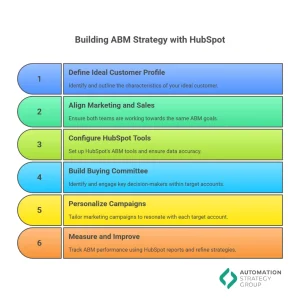
Here is the step-by-step guide for building a HubSpot ABM strategy:
Step 1: Define Your Ideal Customer Profile and Target Accounts
A strong ABM program starts with a clear Ideal Customer Profile. Before you touch HubSpot, you need to know which companies are genuinely worth the effort. Your ICP is the pattern you see across your best existing customers.
Characteristics such as industry, company size, revenue range, tech stack, main pain points, and region all help you decide who is a real fit. Companies that take this step seriously see the payoff.
One study found that teams with a well-defined ICP see up to 68 percent higher account win rates, which is a huge lift when deals are large and complex.
Once you know what “good” looks like, you can build your target account list. This is where sales and marketing usually come together and nominate real companies, using both data and judgment. Start with your existing customer base and your best closed deals, then add “dream accounts” that match the same pattern.
Most teams begin with a manageable pilot list so they can learn without stretching the team too thin. In fact, research shows that organizations on average pursue around 38 accounts at a time in ABM, not hundreds.
At this point, you can tier accounts by importance. HubSpot supports this directly with the ICP Tier property, so you can flag Tier 1, Tier 2, and Tier 3 accounts in the CRM.
- Tier 1 is your must-win set
- Tier 2 is a strong fit
- Tier 3 is a lighter touch.
You can also tick the built-in Target Account checkbox on company records, so HubSpot knows these are part of your ABM program. Once you do that and enable the ABM tools, HubSpot activates the Target Accounts area and surfaces these companies automatically across the platform.
The result of this step is simple but powerful. You now have a shared, visible list of accounts that everyone agrees on, instead of scattered spreadsheets and private wish lists.
Step 2: Align Marketing and Sales Around ABM
ABM fails when marketing and sales work from different playbooks. In a traditional funnel, marketing often chases lead volume, while sales cares about a much smaller set of deals. Now, both teams focus on the same named accounts and work together, from the first impression through to renewal.
When you move to ABM, total lead count often goes down, but deal quality, win rate, and deal size go up. You need leaders to understand that success is no longer “we generated 2,000 leads”, but “we engaged 30 of our 40 target accounts and moved 12 into the pipeline.”
Organizations with strong sales and marketing alignment are 67 percent more effective at closing deals and retaining customers at higher rates, so the stakes are real.
In practice, this often means forming a small ABM squad that owns the first phase. One marketer and one or two sales reps work a shared set of accounts and meet regularly to review progress. HubSpot helps here because everyone can see the same account timelines, logged calls, emails, page views, form fills, and deal stages.
In most cases, teams use an SLA in place so both sides know what they owe each other. For example, how fast sales should follow up once marketing engagement hits a certain level.
The goal is not bureaucracy, but clarity. When both sides are looking at the same accounts, the same data, and the same goals, ABM stops being “a marketing project” and becomes a joint go-to-market motion.
Step 3: Configure HubSpot’s ABM Tools and Fix the Data Layer
With your accounts and alignment in place, the next step is to set up HubSpot so it supports your ABM strategy instead of getting in the way. The good news is that HubSpot already has a lot of ABM features baked in. You just need to turn them on and tune them.
First, enable ABM features from the Target Accounts area in HubSpot. This unlocks dedicated ABM properties such as Target Account, ICP Tier, and Buying Role, along with a Target Accounts home view that shows key metrics and activity for each account.
You can then review and adjust the default buying roles (Decision Maker, Budget Holder, Influencer, End User, Champion, Blocker) so they fit your sales reality. This is a small step that pays off later when you are segmenting by role or checking coverage across a buying committee.
HubSpot also auto-creates useful ABM lists, like “All contacts at target accounts” and “All decision makers at target accounts.” These dynamic segments become your building blocks for email, ads, workflows, and reporting.
If you want to go a level deeper, you can set up a company and contact scoring so high fit, high-engagement accounts float to the top and get extra attention. Scoring models often include fit factors like ICP tier and engagement factors like website visits, email clicks, or form submissions.
Finally, your target account records should have complete and accurate fields for industry, employee count, revenue, region, and key tech stack fields. The same is true for contacts.
You want up-to-date job titles and clean associations to the right companies. With around 60 percent of people changing roles each year, unchecked data goes stale sooner, and you end up chasing ghosts.
Once this step is done, HubSpot becomes a reliable control panel for your ABM program, not just a storage place for names.
Step 4: Build Out the Buying Committee and Capture Real Account Insight
ABM is fundamentally about winning over a buying committee. Complex B2B deals involve multiple stakeholders, with different concerns and levels of influence. Your CRM needs to reflect that reality.
Start by mapping the typical roles involved in a purchase for your product. Often, you will see versions of an economic buyer, a technical evaluator, end-user managers, procurement, and sometimes a senior sponsor. Once your mind is clear, you can go account by account and identify the real people who sit in those seats.
LinkedIn, enrichment tools, and the sales’ existing network are usually the best starting points. Add these contacts into HubSpot, associate them with the correct company, and then tag each person with the right Buying Role.
Alongside the contact list, you should also build a basic picture of each account. That means noting their current initiatives, known challenges, recent news like funding or expansion, and any existing vendors you may be displacing. Many teams use a simple account plan template for this.
HubSpot can act as the home for that plan, either in the notes, custom fields, or links to documents. The result is that when a rep opens a company record, they do not just see a pile of activities. They see a story: who is involved, what matters to them, and what has happened so far.
This level of structure may feel heavy at first, but it makes your later outreach sharper, more relevant, and more coordinated, which is exactly what ABM is supposed to do.
Step 5: Personalize Campaigns for Each Target Account
With accounts and contacts in place, you can move into active engagement. This is where ABM feels different from broad demand generation. Instead of sending generic campaigns to big lists, you craft messages and plays that speak directly to what a specific account cares about.
For your Tier 1 accounts, this starts with a clear, account-specific value narrative. You look at what you know about that company’s goals and challenges and then write out why your product matters to them now.
The core message then threads through everything they see from you: emails, LinkedIn messages, ad copy, landing pages, and even direct mail if you use it. Tier 2 accounts usually receive semi personalized campaigns, where content and messaging are tailored by segment, such as industry or region.
Tier 3 accounts get lighter touch nurture and educational programs that still align with the ICP, but with less manual effort per account.
HubSpot helps you bring all this together. Its email and workflow tools let you send targeted messages to decision makers at target accounts. Smart content on landing pages and website modules lets you switch case studies, headlines, or CTAs based on the visitor’s company or industry.
The ads tool lets you sync your target account lists to LinkedIn and other networks so you can run account based ads rather than broad campaigns. When someone from a target account engages strongly, workflows can flag that to the account owner, create tasks, or enroll them in a specific follow up path.
Multi channel, multi touch engagement is not optional in ABM. Research shows that 80% of sales require five or more follow ups, and ABM is no exception. The difference is that each of those touches is more relevant, more coordinated, and backed by the context you have already captured in HubSpot.
Step 6: Measure ABM Success With HubSpot Reports and Improve Over Time
ABM is resource-intensive, so you need to prove that focusing on a small set of accounts is paying off. HubSpot makes this easier by providing a dedicated ABM dashboard and a library of ABM reports to help you analyze and optimize your ABM strategy.
You can set up an ABM dashboard in HubSpot. You can add this by going to Reports > Dashboards > Create Dashboard and searching the Dashboard Library for ABM.
Some of the key questions you should ask yourself:
- How many of our target accounts are engaged?
- How many have moved into opportunity stages?
- What is our win rate for Tier 1 accounts versus others?
- How much revenue are we generating from target accounts, and which campaigns or channels influenced that pipeline?
HubSpot’s reporting tools let you roll activity up to the account level so you see patterns like “Tier 1 accounts that attended a webinar and received a direct mail pack converted to opportunity at a much higher rate.”
You will also track sales activity on those accounts.
- Are reps calling, emailing, and meeting with the right people inside the target accounts?
- Are some accounts clearly neglected?
When reviewing your dashboards, involve both marketing and sales teams. Over time, the data will provide insights, such as which industries respond best, which tactics move accounts faster, and where your process has friction.
The most effective ABM teams treat this as a loop. They refine their ICP, adjust their target list, tweak campaigns, and clean data continuously. Since 87% of B2B marketers already report higher ROI from ABM than from other tactics, this tuning work is worth it.
Final Thoughts
Learning how to build an Account-Based Marketing strategy with HubSpot is one of the most important steps a growing B2B team can take. It shifts you from chasing leads to building real relationships with accounts that seem important to you. HubSpot provides you with the structure to run ABM properly.
If you are looking to implement ABM with HubSpot and feel like something is missing, we can help you figure it out. Automation Strategy Group works with teams daily to clean up their system, build sound processes, and create outreach that feels personal. Reach out to our HubSpot experts and we will help you move in the right direction.