
Here’s something nobody wants to say out loud at a SaaS revenue meeting: the problem usually isn’t leads. You’ve got leads. What you don’t have is a reliable way to turn them into customers without heroic manual effort from your sales team.
I’ve seen it happen repeatedly. A startup runs a decent paid campaign, gets 300 form fills in a month, the sales team chases 40 of them based on gut feel, and the other 260 go cold in the CRM. Six months later, someone pulls a report and realises that three of those ignored contacts have become customers of a competitor.
That’s not a sales or marketing problem. It’s a systems problem. When it’s set up properly, HubSpot is one of the few platforms that can fix it end-to-end.
But “set up properly” is doing a lot of heavy lifting in that sentence. Most HubSpot portals I’ve seen are about 30% configured. The workflows are half-built. The lead scoring is basically unused. The pipeline stages don’t match what sales actually does.
This blog post covers how to build a successful lead-to-close funnel in HubSpot, the kind that works when nobody’s babysitting it.
Define HubSpot Lifecycle Stages Before Building SaaS Funnel Automation
I know this may sound like contrarian advice: write an article about HubSpot. But the #1 reason I hear from SaaS businesses when their automation writing fails to perform is that there is little to no consensus between Marketing and Sales on the definition of a Qualified Lead.
Before building workflows, reports, or lead scoring, the team needs a shared definition of the funnel.
Marketing defines an MQL as a person from a company with at least 50 employees who downloads an eBook. Sales, on the other hand, wants the MQL to have viewed the pricing page, match their Ideal Customer Profile (ICP), and already know what the software does.
Both sides are correct in that example, but they will continue to impede their handoff process if they can’t find common ground.
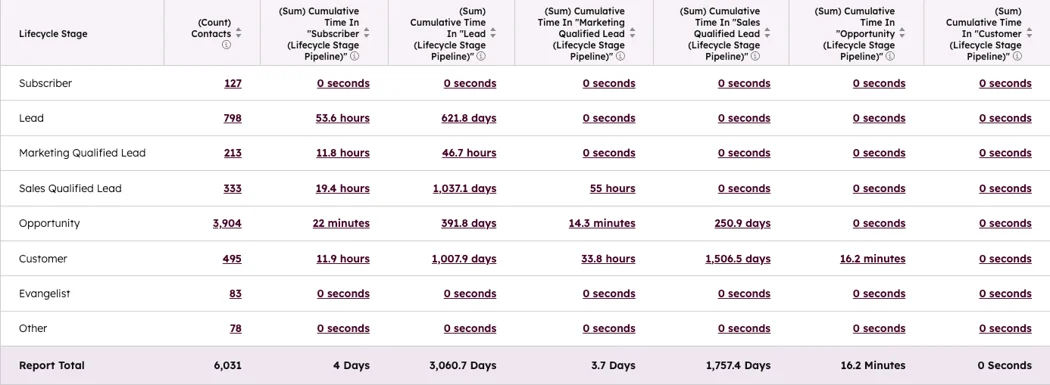
So before you build a single workflow, lock down these definitions in writing:
- Subscriber: opted in, nothing else known yet
- Lead: filled out a form, basic contact info captured
- MQL: meets your ICP criteria AND has shown enough behavioral intent to be worth nurturing
- SQL: marketing has reviewed them, they’re ready for direct sales contact
- Opportunity: active in a sales conversation, deal created in HubSpot
- Customer: closed-won, handoff to onboarding begins
Source: HubSpot
These map directly to HubSpot’s Lifecycle Stage property. Every automation you build will hinge on transitions between these stages, so vague definitions create vague (read: broken) workflows.
Set Up SaaS Lead Capture in HubSpot With Clean Source Data
Most SaaS companies have at least four or five entry points for leads, such as website forms, gated content, webinar registrations, chatbots, product sign-up flows, and paid lead gen campaigns.
The problem is that these sources rarely feed into HubSpot consistently, and when they do, they often dump the same minimal data, such as first name, email, and maybe company name.
That’s not enough to qualify anyone.
Each lead source should be mapped into HubSpot with proper attribution tagging. At a minimum, each contact record should capture:
- Original source and specific campaign or use UTM parameters
- Which form or page they converted on
- Company name and ideally, trigger enrichment from here
HubSpot’s native data enrichment (available on Pro and above) automatically appends firmographic data to new contacts, including company size, industry, revenue range, and tech stack.
If your budget allows, pairing this with a tool like Clearbit or ZoomInfo makes a meaningful difference. A contact you know is a VP of Engineering at a 200-person fintech company in Boston, not “someone who filled out a form.”
Build a Lead Scoring Model for Sales and Marketing Teams
Source: HubSpot
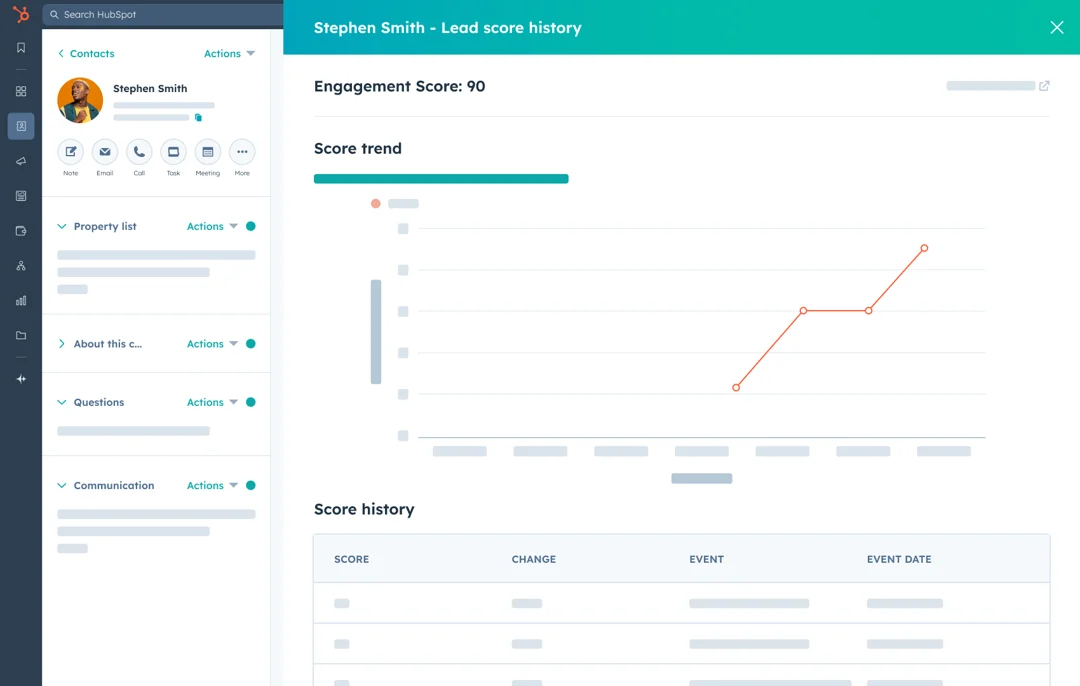
HubSpot updated its lead scoring framework in 2025, retiring the old single-score property in favour of a dual-model approach: Fit Score and Engagement Score. If you haven’t migrated yet, then the old system stopped updating in August 2025. That’s your first task.
Read More: HubSpot CRM Lead Management
The two-score model is genuinely better. Here’s why: a single blended score hides too much. A lead who’s a perfect ICP match but completely unengaged looks identical in a single score to a highly engaged lead who’s completely wrong for the product. The dual model separates those signals so you can act on them differently.
Use Fit Score in HubSpot to Measure ICP Match
This is about who the person is, not what they’ve done. Assign points based on attributes that correlate with your best customers:
- Job title in a buying or influencing role (+10 to +20 points)
- Company size within your sweet spot (+15 points)
- Industry you serve well (+10 points)
- Tech stack signals that indicate fit (e.g., uses Salesforce, which integrates with your product) (+10 points)
- Geography if you have a regional focus (+5 points)
Add negative scoring, too. A freelancer applying from a personal Gmail address when you sell B2B enterprise software should be scored down immediately, as it saves your sales team from wasting time on calls that go nowhere.
Use Engagement Score in HubSpot to Measure Buyer Intent
This is where intent lives. Not all page visits are equal, and your scoring model needs to reflect that. Visiting your blog homepage is not the same signal as spending four minutes on your pricing page or watching 80% of a product demo video.
Some high-intent actions worth scoring:
- Pricing page visit: +15 points
- Demo request form submission: +30 points (honestly, consider auto-routing to SQL at this point)
- Returning to the site within 48 hours of a previous session: +10 points
- Clicking through three or more emails in the same sequence: +10 points
- Watched a product video past 75% completion: +20 points
- Attended a live webinar (not just registered): +15 points
One thing worth flagging is that you should be careful with email open rates as a scoring signal. Since Apple’s iOS 15 Mail Privacy Protection changes, open data is heavily inflated and unreliable. Clicks and on-site behavior are much more honest signals.
Also, enable score decay. A lead who was red-hot six months ago and has since gone completely dark shouldn’t still be sitting at the top of your hot leads queue. HubSpot’s new scoring tool lets you set automatic score reduction for contacts that go inactive. Use it.
Quick benchmark: for B2B SaaS, a strong Fit + Engagement combination (High/High in HubSpot’s matrix) should represent roughly the top 5-10% of your contact database. If you’re seeing 30% of contacts hitting that threshold, your scoring is too generous.
Build HubSpot Workflow Setup for MQL to SQL Automation
Once scoring is live, automatically, workflows drive everything. You need two core lifecycle transition workflows, plus supporting nurture sequences.
Create a Lead to MQL Workflow
This workflow should enroll contacts once they meet the agreed threshold for qualification.
Triggers include Fit Score is High and Engagement Score is Medium or above.
What the workflow does:
- Sets Lifecycle Stage to Marketing Qualified Lead
- Enrolls the contact in an industry-specific or persona-specific nurture sequence
- Creates an internal task notifying the marketing manager for a quick review
- Adds the contact to your MQL list (which sales can see)
Create an MQL to SQL Workflow
This workflow should handle the handoff from marketing to sales.
Triggers include Engagement Score crosses your SQL threshold (say, 70+) or the contact books a demo directly via HubSpot Meetings.
What the workflow does:
- Sets Lifecycle Stage to Sales Qualified Lead
- Creates a Deal in the pipeline at the Opportunity stage
- Routes the deal to the right rep (by territory, company size, or round-robin)
- Creates a follow-up task with a 24-hour due date
- Fires a personalised first-touch email via the rep’s connected inbox through HubSpot Sequences
That 24-hour window genuinely matters. Research shows that SaaS teams that respond to high-intent leads within an hour convert them at a significantly higher rate than teams that wait 24+ hours. The difference isn’t marginal. Automating the first touch removes the human delay.
Use Nurture Workflows for Leads That Are Not Ready to Buy
Here’s the uncomfortable truth about most MQL lists: a good chunk of them aren’t ready to buy this month. They’re interested. They’re doing research. They might even like your product. But they haven’t hit whatever internal trigger will make them move.
Time-based drip campaigns don’t handle this well. Sending email 4 of a sequence, regardless of whether someone opened emails 1, 2, and 3, is just noise.
Behaviour-driven nurture is different. Each email in the sequence responds to what the contact did or didn’t do since the last one. A simple example for a SaaS product:
- Day 0: Case study email matching their industry (triggered by MQL status)
- Day 4 (if email was clicked): Follow up with a product comparison guide
- Day 4 (if email wasn’t opened): Resend with a different subject line
- Day 8 (if pricing page visited in the meantime): Pull them out of nurture, trigger the MQL-to-SQL workflow immediately
- Day 8 (if no pricing page visit): Send an ROI calculator or offer a short diagnostic call
The branching logic in HubSpot’s workflow builder handles all of this. It’s not complicated to set up once your content is ready. Honestly, the content creation is the harder part.
Set Up HubSpot CRM Funnel Automation After the SQL Handoff
The handoff from marketing to sales is where many SaaS funnels quietly fall apart. Marketing passes the lead over, wipes their hands, and moves on. Salespeople either call immediately or don’t call at all. Nobody’s tracking what happens next. And when the deal doesn’t close, there’s no shared data to figure out why.
HubSpot’s Sales Hub solves this, but only if you configure it. The deal pipeline needs to mirror your actual sales process, not a default template. Build workflows that:
- Automatically advance deals to ‘Demo Scheduled’ when a HubSpot Meetings link is used to book
- Fire a pre-meeting sequence to the prospect (confirmation email, prep questions, relevant social proof)
- Alert the rep and their manager if a deal has been sitting in the same stage for more than your average stage duration
- Trigger a short win/loss survey after a deal is marked Closed-Won or Closed-Lost
That last one is the win/loss survey; it is more valuable than most teams realise. The feedback from closed-lost deals is what you feed back into your lead scoring model.
If you keep losing deals where the main objection is price and the contact came in from a particular campaign, that campaign’s leads should score lower on fit.
The funnel improves when you build the feedback loop properly.
Measure Funnel Performance With Revenue-Focused Lifecycle Reporting
Source: HubSpot
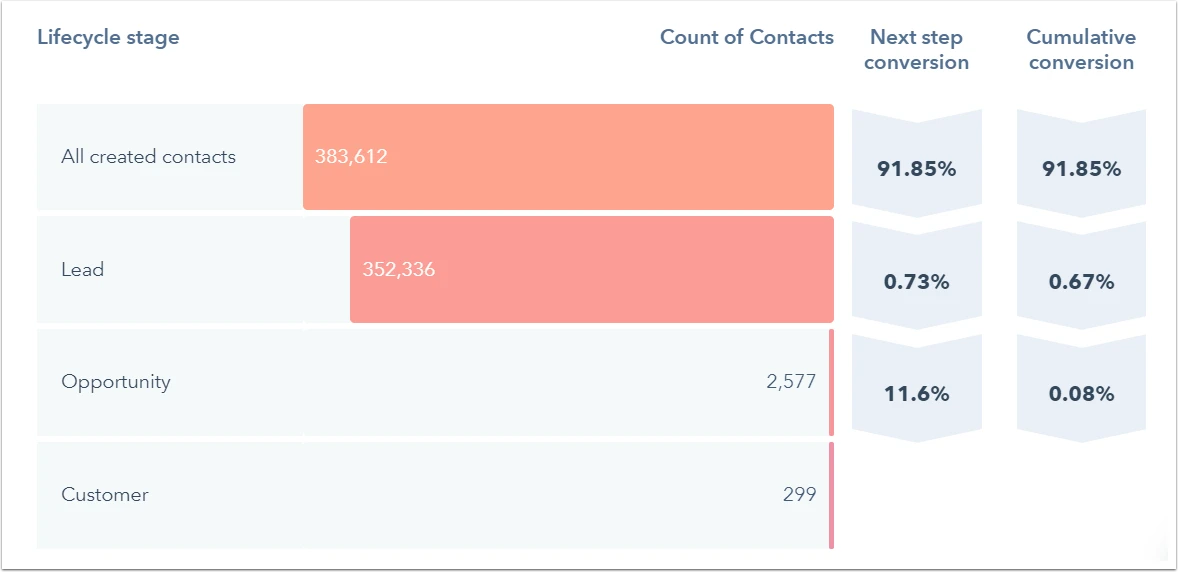
HubSpot’s funnel report (under Reports > Funnel Reports) shows conversion rates for each stage. Set this up as a shared dashboard that both marketing and sales leadership can see. When both teams are looking at the same data, the conversation changes from blame to problem-solving.
The metrics that matter most weekly:
- MQL-to-SQL conversion rate: B2B SaaS benchmark sits between 13% and 21%; if you’re below that, something in your scoring or handoff process needs attention
- Time in stage: how long are contacts sitting at each lifecycle stage before moving forward or going dark
- Deal velocity: how many days from SQL creation to Closed-Won
- Lead source contribution to pipeline: which channels are producing deals, not just leads
That last metric is the one most marketing teams avoid because it’s humbling. Organic social might produce 40% of your leads and 8% of your closed revenue. Paid search might produce 15% of leads and 35% of revenue. Those numbers should directly inform where the budget goes next quarter.
Common HubSpot Funnel Mistakes You Should Avoid
A few things I see go wrong repeatedly in SaaS HubSpot setups:
1. Workflows built before stage definitions are finalised
The workflows start firing based on criteria that the team later revises. Now you have contacts in the wrong lifecycle stages, deals created prematurely, and a mess that takes a weekend to untangle. Define stages first. Build the second.
2. Everyone on the scoring model gets touched, but nobody owns it
Lead scoring drifts. The criteria you set six months ago might not reflect how your best customers actually behave today. Someone needs to own the quarterly review, pull the last quarter’s closed-won deals, review their scores at the conversion point, and adjust the model accordingly.
3. Treating form submissions from events the same as inbound web leads
A contact you collected from a tradeshow badge scan is a very different animal from someone who found your pricing page organically and filled out a demo request. Tagging the entry point properly lets you score and route these differently, which your sales team will quietly thank you for.
4. Skipping the sales team in the setup process
This one’s political but important. If sales reps aren’t involved in defining what a “good lead” looks like, they won’t trust the scoring model. And if they don’t trust it, they’ll ignore the hot leads queue and go back to calling whoever they feel like calling. The automation is only as good as the adoption.
Where to Start If You’re Building This From Scratch
If your HubSpot portal is currently a glorified contacts database with a couple of half-built workflows, don’t try to implement everything at once. Here’s the order that makes sense:
First, get your lifecycle stage definitions agreed and documented. Everything else depends on this.
Second, audit your lead sources and make sure everything is flowing into HubSpot with clean attribution data. Fix the data before you build on top of it.
Third, build your Fit and Engagement scoring models. Start with five or six criteria each and refine over time.
Fourth, build the Lead-to-MQL and MQL-to-SQL transition workflows. These two alone will do more for your pipeline than anything else on this list.
Fifth, build your MOFU nurture sequences. Get at least one behaviour-driven track live for your most common buyer persona.
The deal pipeline automation and reporting can come in the next sprint. Trying to perfect everything before launching anything is how these projects stall for months.
The best HubSpot funnel setup I’ve ever seen was built incrementally over eight months. The worst was spec’d out in a 40-page document and never fully launched. Ship the core, measure it, improve it.
Read More: Renewal Pipeline in HubSpot
Final Thought
Automating Marketing for SaaS businesses is a process that is converted into a codebase. Companies that successfully execute this process are not doing anything extraordinary; they have simply created a clear funnel map, aligned scoring with how their actual customers behave, and developed automated actions that remove time-consuming manual steps.
Although the HubSpot platform provides businesses with the tools they need for success, the most important aspect of HubSpot – and one of the key elements to its long-term success within a business is the amount of thought that goes into the above processes before you start.
If you take care of the above areas well, your funnel will ultimately be self-sufficient! For more information, schedule a strategy call with one of our experts.
FAQs About Marketing Automation for SaaS in HubSpot
What is marketing automation for SaaS?
Marketing automation for SaaS is the use of software to move leads through the funnel with less manual work. In HubSpot, that usually includes lead capture, lifecycle stage updates, scoring, nurture workflows, meetings, sales tasks, and pipeline reporting.
How do you set up a lead-to-close funnel in HubSpot?
A proper HubSpot lead-to-close funnel starts with lifecycle stage definitions, then lead capture and source tracking, then scoring, then MQL-to-SQL workflows, then sales-side automation and reporting. If those pieces are built in the wrong order, the funnel usually becomes harder to trust over time.
How do you set up a lead-to-close funnel in HubSpot?
A proper HubSpot lead-to-close funnel starts with lifecycle stage definitions, then lead capture and source tracking, then scoring, then MQL-to-SQL workflows, then sales-side automation and reporting. If those pieces are built in the wrong order, the funnel usually becomes harder to trust over time.
Does HubSpot still use the old lead scoring property?
HubSpot moved away from legacy score properties. HubSpot announced that old score properties would stop updating on August 31, 2025, with the newer lead scoring tools centered on fit and engagement scoring.
What should SaaS companies measure in a HubSpot funnel?
The most useful measures are stage conversion rates, time in stage, deal velocity, and pipeline or revenue contribution by source. HubSpot funnel reports and campaign lifecycle reporting are built for exactly that kind of visibility.