
In B2B, recurring subscription revenue is an important aspect of the business. You count on customers renewing their contracts each year (or month) to hit your growth goals.
A renewal pipeline in HubSpot manages these post-sale subscription deals. It tracks when contracts expire and what happens next: renewals, upsells (expansions), downsells (reductions), or cancellations (churn).
A structured pipeline shows your net revenue retention immediately. Without it, renewals and expansions can get buried, and churn slips through the cracks.
In this blog post, we’ll explain how you can set up a renewal pipeline in HubSpot for a subscription-based business, focusing on expansions, downgrades, and churn alerts.
Why is a Renewal Pipeline Important?

The renewal pipeline is the continuation of your sales process. After the first sale closes, the customer moves into a renewal cycle. Having a dedicated renewal pipeline ensures nothing is left behind. Key benefits of a renewal pipeline include:
- Clear Renewal Tracking: Each contract renewal is its own deal in HubSpot. You see all open renewal deals and their status immediately, instead of digging through spreadsheets.
- Accurate Forecasting: When every renewal is logged as a deal, you can forecast revenue reliably. You’ll know exactly how much recurring revenue to expect, avoiding any future surprises.
- Growth Visibility (NRR): By tracking renewals, upsells, and churn together, you can calculate Net Revenue Retention (NRR). NRR tells you if your existing customer revenue is growing or shrinking.
- Early Churn Alerts: Tracking account health and renewal dates lets you spot trouble early. For example, if usage drops or a payment fails, you can flag the account “At Risk” and intervene.
Without this setup, upsells can disappear in legacy deals, and churn data disappears. A structured renewal pipeline keeps these events visible and actionable.
Setting Up the Renewal Pipeline in HubSpot
Here is a step-by-step guide for setting up a renewal pipeline in HubSpot with automation workflows:
Step 1. Create a Dedicated Deal Pipeline
Source: HubSpot Community
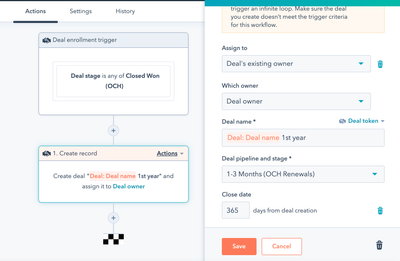
In HubSpot, go to Deals > Pipelines and create a new pipeline. If your renewal stages differ significantly from new-business stages, a separate pipeline is helpful.
Otherwise, you could reuse your main pipeline and tag deals by type. The key is that renewal deals are easy to find and separate from new leads.
Step 2. Define Renewal Stages
Choose stage names that fit your subscription workflow. A typical SaaS renewal pipeline includes:
- Active Contract: The subscription is active and not due for renewal yet.
- Upcoming Renewal (<90 Days): The renewal date is approaching (e.g., within 90 days).
- Renewal Proposal Sent: A renewal quote or proposal has been sent to the customer.
- Renewal Negotiation: The customer is discussing terms or pricing.
- Renewed (Closed/Won): The customer signed the new contract for the next term.
- Churned (Closed/Lost): The customer chose not to renew and has churned.
For example, you can define renewal stages like “Active MRR,” “Upcoming Renewal (<90 days),” “Renewal Conversation Scheduled,” “Renewal Proposal Sent,” “Renewal Negotiation,” and the closed stages. A sample pipeline might look like:
| Stage | Explanation | Team Action |
| Active Contract | Subscription active, not due soon | Monitor usage; prep for renewal |
| Upcoming Renewal (<90d) | Renewal due within ~90 days | AM/CSM reaches out; send reminders |
| Renewal Proposal Sent | Renewal offer sent to customer | Follow up on proposal; answer questions |
| Renewal Negotiation | Terms under discussion | Negotiate pricing or terms as needed |
| Renewal Closed/Won | The customer agreed to renew | Record renewed revenue; update next due |
| Renewal Closed/Lost | Customer did not renew (churned) | Log churn reason; plan next steps |
Each stage should trigger clear actions. For example, at Upcoming Renewal (<90 days), you might auto-send the customer a renewal reminder email and assign a task to the account manager to initiate a call. At Renewal Proposal Sent, create a follow-up task. Clearly defining stages ensures deals don’t stall.
Step 3. Customize Deal Properties
You can add or use deal fields so each renewal deal carries the right information. Key properties include:
- Renewal Date: The expiration date of the current contract (used for triggers).
- Amount: The renewal’s value (annual or monthly recurring revenue).
- Deal Type: Dropdown (New Business, Renewal, Expansion, Downgrade).
- Churn Reason: If a renewal deal is lost, require a reason (Budget, Feature Gap, etc.).
Capturing a churn reason is crucial, as most teams “drop the ball” on this, so make it required. This forces reps to document why the customer left, providing data to improve your offering.
Optionally, you can copy revenue numbers to the Company record (via workflows) so each account shows total MRR/ARR, but you can track everything with deals.
Step 4. Automate Deal Creation
Source: HubSpot
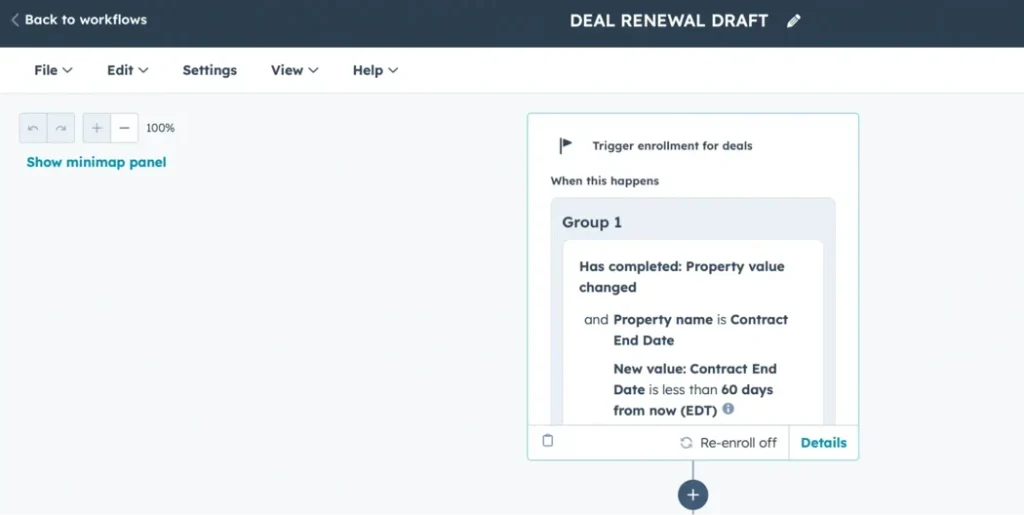
You should not manually mark a calendar. Instead, use an automated workflow:
- Auto-Create Renewal Deals: Set a workflow that, 90 days before each contract end date, HubSpot automatically creates a renewal deal (Deal Type equals Renewal). The Gist recommends exactly this approach: “trigger a workflow that … creates a corresponding deal in a dedicated renewal pipeline”.
- Notifications: The same workflow can email the CSM or Slack the team when a renewal deal is created, so everyone knows to start outreach.
- Recurring Cycles: Repeat this each term. For multi-year contracts, have the workflow create successive renewal deals every year.
With this in place, your pipeline is never empty. As renewals approach, deals will already be there to work on.
Step 5. Assign Deal Ownership
Define who handles renewals vs expansions. A common SaaS model is:
- Sales/AEs: Own new sales and expansion deals.
- Customer Success/AMs: Own renewals and churn prevention.
For instance, once a deal closes, hand it off to a CSM who will manage the renewal. HubSpot advises tagging deals by type and using automation to route them to the correct owner. You should avoid any confusion – if everyone knows “Renewal” deals go to CSMs and “Expansion” deals go to AEs, nothing falls through.
Step 6. Company vs. Custom Object
You need to link each deal to the right customer record. For one subscription per company, use the Company object. If accounts have multiple subscriptions (e.g., different departments or products), consider a custom “Customer Success” object for each contract.
A custom object gives more flexibility (you can attach multiple renewal deals, health scores, QBRs, etc.), though it requires more setup. Many teams start with the Company record and move to a custom object later if needed.
Tracking Expansions and Downgrades
Customers often change their usage between renewals. It’s important to capture these changes:
- Minor Adjustments: If a customer adds a few seats or gets a small discount, update the current renewal deal’s amount and note the change.
- Major Upsells (Expansions): If a customer upgrades to a higher tier, adds a whole new product, or makes a large purchase, create a new deal. Set Deal Type to Expansion. This ensures the added revenue is visible separately.
- Major Downsells (Contractions): If they significantly cut back service, treat it similarly (for example, as a Downgrade deal). Large downgrades should be their own deal, so you can report on lost revenue.
| Change Type | Example | HubSpot Action |
| Minor Upsell | +2 seats on an existing plan | Edit existing renewal deal; log it |
| Major Upsell | Upgrade from Basic to the Enterprise tier | Create a new Expansion deal |
| Minor Downsell | Drop 1 user or a small feature | Edit existing deal; note reason |
| Major Downsell | Remove an entire product module | Create a new Downgrade deal |
| Cancellation | End subscription completely | Close renewal deal as Lost (Churned) |
This way, each deal accurately reflects one revenue change. HubSpot suggests that small changes should be in one deal, but “big changes” get a new Expansion deal. Also, you should track the increase and decrease in MRR to check upsells and downsells separately.
Using Deal Type to filter reports makes analysis easy. For instance, sum all deals with Deal Type equals Expansion to see your total upsell growth. Proper tracking turns expansions into visible growth and flags downsells immediately.
Detecting Churn: Alerts and Prevention
Even with a great pipeline, some customers may cancel. Therefore, you should build churn detection into HubSpot:
Account Health Score: Create a property (e.g., on the Company record) called “Account Health” with values like Healthy, Passive, At Risk. Use usage data, support tickets, or NPS to set this automatically.
Automated Alerts: Make a workflow: If Account Health changes to “At Risk,” then notify the account owner and leadership (via email or Slack).
Usage or Payment Triggers: Integrate billing or product data. For example, if an invoice is overdue, create a task to follow up. If product usage drops below a threshold, trigger an upsell or engagement task.
QBRs and Check-Ins: Schedule Quarterly Business Reviews (QBRs) or regular check-ins with customers. Log them in HubSpot. Track the date of the last QBR and have a reminder if it’s over 90 days. Consistent touchpoints improve renewal chances.
Churn Reason Reporting: As noted, when a renewal deal is lost, require the rep to pick a churn reason. You should run reports on these reasons to identify patterns (e.g., if many cite “Budget,” you might address pricing).
The goal is to catch red flags before the contract ends. HubSpot can also track if a renewal deal drags past its end date and escalate accordingly.
Automating these alerts turns reactive into proactive account management. In short, you should make churn risks visible and make timely interventions whenever possible.
Automation and Reporting
With deals flowing properly, use HubSpot’s automation and analytics:
Timed Workflows: Use renewal dates as triggers. For example, at 90, 60, and 30 days before expiration, automatically change deal stages or assign tasks. The Gist suggests moving deals into “Renew in 90 Days,” “60 Days,” etc. via workflows. This ensures each deal progresses on schedule.
Task/Email Reminders: Automate internal tasks and customer emails. At 30 days out, create a task “Call customer about renewal.” Schedule an email to remind the customer of their upcoming renewal. HubSpot CRM can send renewal reminders at set intervals (e.g., 120, 60, 30 days).
Deal Stage Updates: You can even auto-close deals. For instance, if the customer pays, a workflow could mark the deal Renewed and generate the next renewal deal.
Dashboards & Metrics: Build HubSpot reports for key metrics:
Upcoming Renewals: A pipeline chart of deals expiring soon.
Renewal Rate: Percentage of deals renewed vs churned.
Expansion MRR: Total upsell revenue in a period.
Downgrade MRR: Total lost revenue from downgrades.
Churn Rate & Reasons: Number of churns and common causes.
Retention Rates: Use formulas: NRR = (Renewals + Expansions – Churn) ÷ Starting ARR, and GRR = Renewals ÷ Starting ARR.
With clean data and dashboards, your leadership gains visibility into renewals and churn in real time.
Mistakes to Avoid in Your HubSpot Renewal Pipeline
Avoiding common setup and process mistakes in your renewal pipeline can prevent revenue leaks and improve reporting accuracy. Here are a few issues we often see teams get and how to fix them.
1. Mislabeling Deal Types
Always tag each deal correctly as a Renewal, Expansion, or Downgrade. If upsells are recorded as new business or lumped into general renewals, your reporting will be off, and you won’t get a true picture of Net Revenue Retention. Keeping deal types consistent makes your dashboards and revenue metrics far more reliable.
2. Unclear Ownership
Every renewal should have one clear owner. When ownership is split between sales and customer success, or passed off without documentation, renewal deals often get missed. Assign ownership at deal creation and ensure hand-offs are tracked in HubSpot.
3. Skipping Automation
Manual tracking leads to missed follow-ups. Setting tasks in calendars or relying on someone to remember a date often results in late or forgotten outreach. Therefore, you should automate the renewal deal creation, internal task assignments, and email reminders.
4. Missing or Incomplete Data
If key details like churn reason, health score, or renewal date aren’t recorded, you lose valuable insights. Make these fields required and use workflows to keep records complete and up to date. That way, you always know why customers churn, who’s at risk, and what your forecast looks like.
Bottom Line
Renewals and expansions power your recurring revenue, but only if you track them systematically. In conclusion, for a successful renewal pipeline in HubSpot, you should create a new deal for each renewal, treat major upsells or downsells as separate deals, log churn reasons on lost deals, automate all reminders at key intervals, and measure the results through dashboards (e.g., retention and churn metrics).
At Automation Strategy Group, we specialize in HubSpot for subscription-based businesses. We’ve helped 100+ companies streamline their HubSpot setup and automate their renewal processes.
If you’re ready to secure renewals and expand revenue predictably, schedule a free consultation with one of our HubSpot experts.